Faster Google Workspace Enterprise Technology Adoption Starts with Interoperability

 April 6, 2026
 July 29, 2026



Table of contents
- 1. Why Google Workspace adoption often stalls
- 2. What interoperability actually means
- 3. Why interoperability is the missing link in adoption
- 4. What enterprises can already do today
- 5. Where the remaining gaps still hurt adoption
- 6. Business benefits of faster Google Workspace adoption
- 6.1. Lower resistance to change
- 6.2. Less context switching
- 6.3. Better cross-functional collaboration
- 6.4. Faster time-to-value from Workspace investments
- 6.5. Stronger governance than unofficial workarounds
- 7. Real-world scenarios where interoperability matters most
- 8. Best practices for accelerating adoption through interoperability
- 9. Enterprise technology adoption: How to measure success
- 10. Ensure successful Google Workspace adoption with interoperability
Many enterprises operate across multiple collaboration platforms. Case in point? According to Okta’s 2025 Business at Work Report, 48% of Microsoft 365 customers also use Google Workspace — a clear sign of how common mixed-platform environments have become.
If you’re looking to accelerate Google Workspace enterprise technology adoption, understanding this reality is critical because adoption slows when employees are forced to change both their tools and their workflows at the same time.
By reducing workflow disruption, interoperability — connecting Google Workspace and Microsoft 365 to enable seamless cross-platform collaboration — accelerates adoption while minimizing risk.
Fast adoption drives quicker time-to-value, reduces resistance, and maintains collaboration continuity across the organization.
Why Google Workspace adoption often stalls
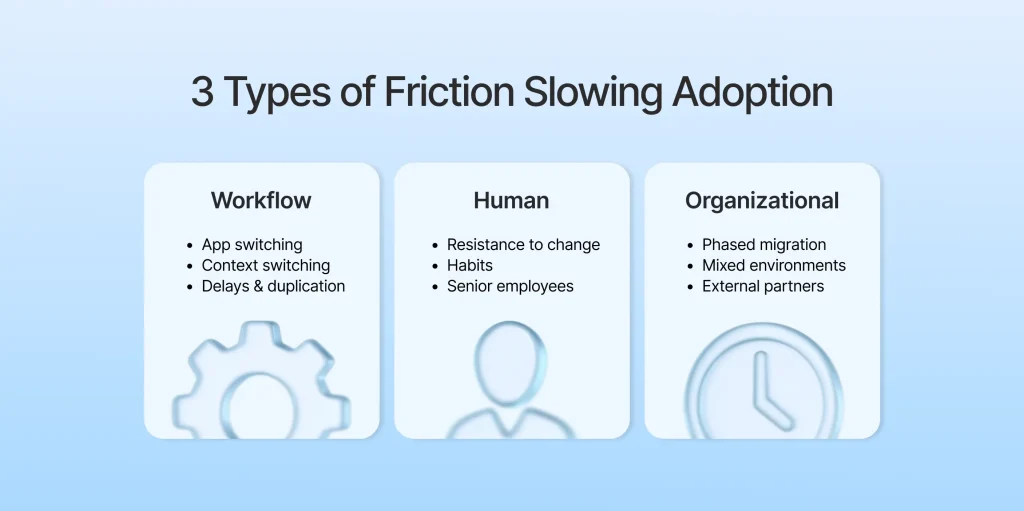
Google Workspace adoption often stalls for these three key reasons.
Human friction
Employees often resist changing familiar tools and habits. While this tendency is found across all genders and seniority levels, leaders and long-tenured employees can be especially slow to shift behaviors. A 2025 study, for example, found that 76% of workers had seen senior colleagues resist new tools.
This all makes perfect sense: Even when a platform is better, users default to the system they already know.
Workflow friction
When organizations use both Google and Microsoft, messaging happens in one platform, file sharing in another, and meetings somewhere else. Toggling between apps and tabs drains productivity, as users incur context switching losses.
Making matters worse, collaboration across different platforms can lead to delays, duplicate work, and missed updates. Employees often lose time waiting on colleagues in another platform or searching across systems for the right files and context.
Organizational friction
Migration rarely happens all at once. An organization, for example, isn’t going to move 27,000 users from Microsoft to Google overnight. More likely, they’ll start with 5,000 users to test the waters and ensure that important workflows are still intact.
Even if an enterprise decides to move entirely to Google, it will be a piecemeal process. As a result, a mix of folks — different departments, acquired companies, contractors, and external partners — may still live in the Microsoft ecosystem.
In other words, coexistence — rather than a full migration — is often the reality in enterprise technology adoption, not the exception.
What interoperability actually means
More than just connecting two different systems, interoperability refers to the ability for users on one platform to collaborate, send files, and support shared workflows with colleagues on another platform, without extra effort. It goes beyond simply connecting systems, ensuring that data, context, and actions can move seamlessly across environments with minimal friction.
True interoperability allows users to collaborate as if they were using the same platform even when they aren’t.
For the purposes of this article, interoperability means enabling Google Workspace and Microsoft Teams / Microsoft 365 to work together seamlessly.
Many organizations operate in mixed environments due to mergers, client requirements, or team preferences. While some users rely on Google Workspace tools, including Google Chat, others live in the Microsoft 365 ecosystem, using Microsoft Teams. In this scenario, interoperability means enabling these groups to communicate, share files, and even launch voice and video calls without constantly switching platforms or losing functionality.
While people often use the words interoperability and integration as substitutes, it’s important to distinguish the two terms.
Integration often implies a one-way or limited connection between systems — like syncing calendars or automatically copying data from one system to another. Interoperability, on the other hand, is about maintaining a cohesive, cross-platform collaboration experience that allows teams to continue using their preferred tools while still moving projects forward with their colleagues.
Why interoperability is the missing link in adoption
Most platform adoption strategies tend to focus on three pillars:
- Migration
- Training
- Communications
Data is moved, users are taught how to use the new tools, and leadership encourages adoption. While this approach might seem comprehensive, it often falls short in practice.
Why?
Because users care less about how a new platform is rolled out than about how the change affects day-to-day work.
If switching platforms makes it harder to collaborate with colleagues, results in constant app switching, or breaks familiar workflows, adoption will lag — no matter how much training or communication is provided. People naturally gravitate toward the path of least resistance, even if that means reverting to old tools or creating workarounds (potentially leading to shadow IT risks).
This is where interoperability shines. It lowers the cost of change by allowing users to continue working across platforms without interruption. Instead of forcing an immediate, all-or-nothing shift, interoperability lets users enjoy a smoother transition to new tools by enabling them to:
- Continue collaborating with colleagues who are still on different platforms
- Avoid constantly jumping between apps to complete simple tasks
- Maintain continuity while teams move through phased rollouts
Add it all up, and interoperability allows organizations to change platforms without breaking workflows — which is how adoption feels like progress instead of disruption.
What enterprises can already do today
Interoperability isn’t some futuristic sci-fi concept. It’s reality for many enterprises today. In fact, there are several different ways organizations operating in mixed-platform environments can enable collaboration between Google Workspace and Microsoft 365 without forcing an immediate full migration.
For example, Google Workspace already supports working directly with Microsoft Office files. Users can open, edit, comment on, and collaborate on Word, Excel, and PowerPoint files in Google Docs, Sheets, and Slides while preserving the original Office file format.
Calendar interoperability is also evolving. Google supports bidirectional calendar integration with Microsoft 365 using the Microsoft Graph API. As a result, colleagues and business partners can more reliably share availability across platforms. This is particularly important as Microsoft phases out Exchange Web Services, with end of support currently scheduled for Oct. 1, 2026. Organizations that modernize their calendar integrations via Microsoft Graph API can avoid headaches ahead of that deadline.
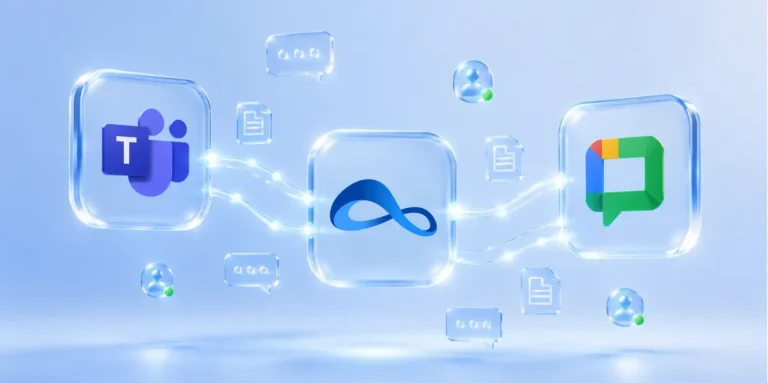
More recently, Google has expanded its cross-platform communication capabilities. In August 2025, the company announced enhanced interoperability between Google Chat and Microsoft Teams through NextPlane OpenHub, aimed specifically at organizations operating in multi-platform environments. OpenHub users can communicate with colleagues across Google and Microsoft without switching tools, helping reduce the day-to-day friction of disparate collaboration stacks.
Taken together, these capabilities reinforce a key point: more than a temporary workaround, coexistence is an established operating model.
Enterprises thinking about moving from Microsoft to Google don’t have to choose between platforms overnight. Instead, they can make the move gradually while supporting seamless collaboration across both.
Where the remaining gaps still hurt adoption
While native coexistence capabilities have come a long way in recent years — think being able to seamlessly edit Word documents in Google Docs — they don’t eliminate all friction.
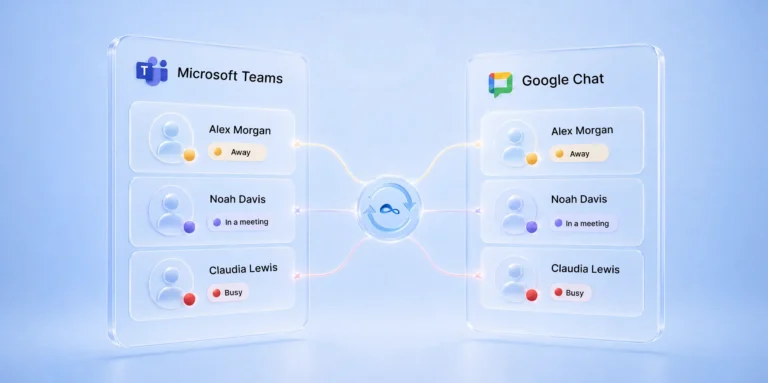
Many organizations still encounter challenges in day-to-day collaboration, particularly in areas like messaging, presence visibility, file sharing, meeting escalations (e.g., moving from chat to a voice or video call), and overall workflow continuity.
Without true interoperability, employees still need to jump between systems to find context, continue conversations, and access the right content. A chat started in one platform may not carry smoothly into a meeting in another. Presence indicators may not reflect real-time availability across platforms, and files shared in one environment can still be difficult to locate in another.
These gaps create last-mile friction — i.e., small but persistent disruptions that slow work down and, over time, hinder enterprise technology adoption. Even when core integrations are in place, these “minor” inefficiencies add up significantly, which limits the perceived value of the new tools in each user’s mind.
Using purpose-built interoperability tools like NextPlane OpenHub, organizations can address the remaining gaps and enable more continuous cross-platform workflows across Google Chat and Microsoft Teams. This, in turn, makes adoption smoother, faster, and more sustainable.
Business benefits of faster Google Workspace adoption
When it comes to enterprise technology adoption, the sooner it happens the faster businesses generate ROI and unlock more value. By reducing friction and enabling cross-platform collaboration, organizations enjoy a range of benefits across productivity, collaboration, and governance.
Lower resistance to change
One of the biggest barriers of enterprise technology adoption is user resistance. When employees feel forced to abandon familiar tools overnight, they often disengage or revert to old workflows.
Interoperability reduces that pressure by allowing teams to adopt Google Workspace while still collaborating with colleagues who remain on Microsoft 365. This flexibility is critical in large enterprises, where change fatigue and tool fragmentation are common.
Research shows that fewer than one-third of organizational transformations fully succeed, highlighting how difficult change can be when it’s not managed effectively. By preserving existing ways of working and keeping disruption to a minimum, organizations can introduce Google Workspace more gradually, building confidence and buy-in over time. The result is a smoother transition with happier users — and a higher chance adoption efforts succeed.
Less context switching
Context switching is a hidden productivity drain. As employees move from application to application, they get less done because interruptions adversely impact focus, which reduces output. In mixed-platform environments, these costs are amplified as users jump between messaging apps, meeting tools, and file-sharing systems.
Interoperability reduces the need for these constant platform hops by enabling communication and collaboration to flow seamlessly across systems. Instead of chasing information across tools, employees can stay focused on their work.
Better cross-functional collaboration
Modern enterprises rarely operate within a single system. Teams span departments, regions, subsidiaries, and external partners — many of which may use different collaboration platforms.
Without interoperability, these differences create data silos that slow down communication and decision-making. According to research from Harvard Business Review, 75% of cross-functional teams struggle to meet key performance metrics. Fragmented collaboration tools can be one contributing factor.
By enabling seamless collaboration across Google Workspace and Microsoft Teams, organizations can maintain continuity across organizational boundaries. Teams can share information, coordinate work, and move projects forward without being held back by disparate platforms.
Faster time-to-value from Workspace investments
Technology investments only deliver value when employees actually use the tools. When enterprise technology adoption is slow, time-to-value is delayed, and ROI suffers.
Interoperability accelerates adoption by allowing Google Workspace to fit into existing workflows rather than forcing teams to change. Employees can start using new tools in familiar contexts, which reduces friction and shortens the learning curve. As a result, organizations realize value faster and build momentum for broader transformation.
Stronger governance than unofficial workarounds
When sanctioned cross-platform collaboration options are limited, employees often create their own workarounds — like WhatsApp, text messages, or using other tools without IT’s knowledge. These informal solutions introduce risks around data security, compliance, and version control.
By providing a controlled alternative, interoperability enables secure ways to collaborate across platforms. Instead of relying on fragmented processes, organizations can maintain visibility, enforce policies, and ensure data flows through approved channels — reducing risk while still supporting productivity.
Real-world scenarios where interoperability matters most
The value of interoperability becomes clearest in the everyday scenarios enterprises face during migration, coexistence, and external collaboration.
Phased Google Workspace rollout
Organizations rarely migrate all users from Microsoft to Google at once. Usually, they start with a single business unit while the rest of the team remains on Microsoft. Interoperability ensures teams can still collaborate seamlessly during the transition, avoiding disruption and maintaining productivity.
M&A integration
In mergers and acquisitions, it’s common for one company to use Google while the other uses Microsoft. Interoperability allows both sides to work together immediately without waiting for a full system consolidation.
Partner collaboration
External partners, vendors, or customers often remain on Microsoft Teams while internal teams adopt Google Chat. Interoperability enables communication across these boundaries, reducing delays and keeping projects on track.
Global or role-based coexistence
Different regions or roles — like frontline workers, support teams, and knowledge workers — may adopt new platforms at different speeds. Interoperability supports staggered adoption, allowing each group to transition without breaking collaboration across the organization.
Best practices for accelerating adoption through interoperability
Interoperability can accelerate adoption, but only if it’s implemented with clear priorities and real user needs in mind. To accelerate adoption while reducing cross-platform friction, focus on these best practices:
- Start with high-friction workflows. Focus on the workflows that cause the most disruption, like cross-platform messaging, meetings, and file sharing. Addressing these pain points first delivers immediate value and builds trust needed for widespread adoption.
- Pilot with cross-platform-heavy teams. Begin with teams that rely heavily on communication across Google Workspace and Microsoft 365. These groups will see the biggest impact early and can provide meaningful feedback you can use to refine your approach before scaling across the organization.
- Train by role and workflow. Avoid generic training. Tailor guidance to how different roles actually work, showing users how interoperability fits into their day-to-day tasks.
- Define success metrics upfront. Establish clear metrics before rollout, such as reduced context switching, faster response times, and increased cross-platform collaboration. This ensures you can measure impact and demonstrate value.
- Gather feedback early and often. Engage users throughout the rollout process to identify friction points and make quick adjustments. Continuous feedback ensures the solution aligns with your team’s real-world needs.
- Evaluate solutions holistically. Choose interoperability solutions based on security, administrative control, user experience, and how well they support real collaboration patterns — not just technical compatibility.
- Align stakeholders before scaling. Ensure IT, security, and business leaders are aligned on goals, governance, and rollout strategy. This alignment is critical for scaling interoperability successfully across the organization.
Enterprise technology adoption: How to measure success
Measuring adoption goes beyond tracking logins. It requires understanding how effectively employees are using new tools in day-to-day work and whether cross-platform friction is actually decreasing.
To assess the success of your Google Workspace migration, track these key metrics:
- Google Workspace active usage by team
- The volume of cross-platform collaboration
- Reductions in duplicate work or app switching
- Message response times across platforms
- Meeting scheduling friction
- User satisfaction during migration
- Time-to-adoption for newly onboarded groups
Ensure successful Google Workspace adoption with interoperability
In mixed-platform enterprises, the challenge isn’t just rolling out Google Workspace, it’s helping employees adopt it without disrupting how they work.
Interoperability makes this possible by reducing friction, preserving collaboration continuity, and providing a practical, phased path to adoption.
The key takeaway?
The faster employees can use Google Workspace without losing connection to Microsoft-based colleagues, the faster adoption can take hold — and the sooner the organization can realize value from its investment.
Explore what to look for in an interoperability solution that connects Google Workspace and Microsoft Teams.