Chat Etiquette & Collaboration Best Practices for High-Performing Teams

 February 26, 2026
 March 2, 2026



Table of contents
- 1. What is chat etiquette at work?
- 2. 10 business chat etiquette tips
- 2.1. 1. Communicate clearly and concisely
- 2.2. 2. Respond in a timely manner
- 2.3. 3. Ask questions
- 2.4. 4. Be receptive to feedback
- 2.5. 5. Use the right collaboration medium
- 2.6. 6. Avoid notification overload
- 2.7. 7. Pay attention to your tone
- 2.8. 8. Respect time zones and schedules
- 2.9. 9. Hand projects off clearly
- 2.10. 10. Flag blockers early
- 3. 4 collaboration best practices that support chat etiquette
- 4. Effective collaboration starts with etiquette!
Effective communication is a cornerstone of today’s most successful organizations. In the age of remote work, on-the-go employees, and distributed teams, learning chat etiquette and following best practices of how teams communicate are key ingredients of success.
According to recent data, companies that excel at collaboration are 5x more likely to be high performing and they’re also 21% more profitable. On the flipside, 69% of managers say a lack of strong communication is the primary cause of workplace failure, and 54% of workers believe that poor communication costs their companies money.
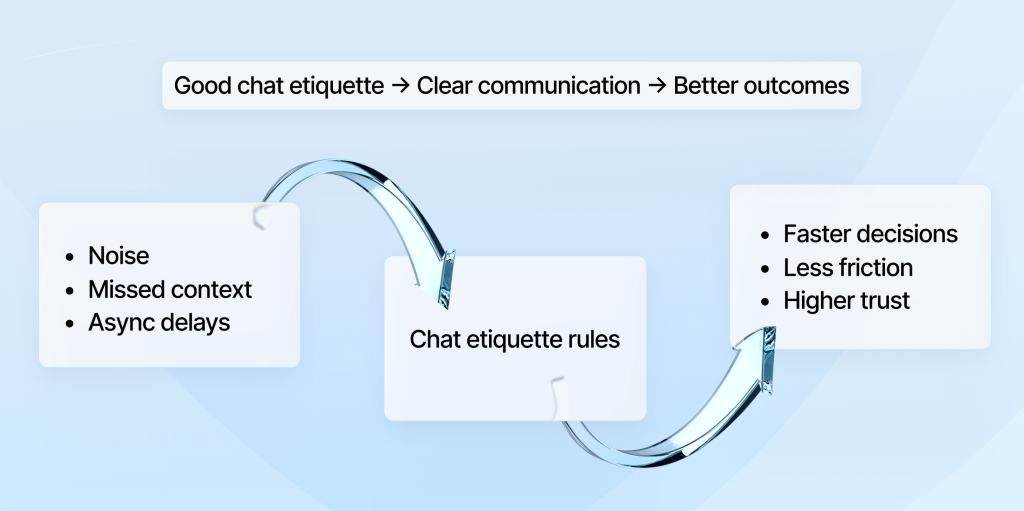
Add it all up, and mastering chat etiquette at work and learning how to communicate effectively can have a tremendous impact on employee morale — and your bottom line.
Effective communication starts with equipping your team with the right tools. After all, employees are often on the move and don’t work out of the same offices as often as they used to.
When it comes to communication tools, you might choose Google Chat or Slack as the best solution for your team. Or maybe you have some users on Google Chat and others on Microsoft Teams and decide that connecting the two platforms via an interoperability platform sets your employees up for success.
In addition to selecting the right tools, successful collaboration also requires your employees to know how to work well with each other, both synchronously and asynchronously.
Keep reading to learn about 14 tips your organization can use to improve remote team communication etiquette, sharpen teamwork skills, and move projects forward with purpose. But first, let’s define what exactly chat etiquette is.
What is chat etiquette at work?
Chat etiquette at work refers to the standards of accepted norms and behaviors that guide how employees communicate with colleagues in a professional, respectful, and efficient manner using workplace messaging tools like Slack, Google Chat, and Microsoft Teams. It includes how messages are written, when they’re sent, how quickly folks acknowledge their colleagues’ requests, and the general tone employees use to work together over chat.
By developing strong chat etiquette skills, employees can reduce misunderstandings, communicate more clearly, and build more productive working relationships — especially in remote and hybrid environments.
10 business chat etiquette tips
Now that you understand why chat etiquette is important, let’s examine 10 remote work chat etiquette tips that’ll help your team work better together from anywhere in the world.
1. Communicate clearly and concisely
When writing a chat message to a colleague, start with the purpose of your message upfront, using simple language and avoiding jargon to get to the point quickly. Whether you’re asking a question, providing a project update, or just sharing news, you want your coworker to easily understand the point of your message.
To make it easier for colleagues, break long messages into bullets and short paragraphs so that your words are easy to scan. Clearly state what your colleague needs to do, and reread what you’ve written before sending it over to make sure it’s crystal clear.
Key takeaway: Clear, concise communication saves time and keeps projects humming along.
2. Respond in a timely manner
When you’re working with colleagues in different locations, never be a blocker. Respond to messages in a timely manner, even if that’s just acknowledging that you’ve received your coworker’s note but can’t give a proper response right away. In the event any projects are delayed or timelines shift, communicate proactively so your team can adjust accordingly.
In async environments, don’t expect colleagues on the other side of the world to get back to you immediately (spoiler alert: they won’t). Responding to messages that can help other folks move their projects forward first is a cornerstone of async communication etiquette, as is aiming to get back to colleagues as quickly as you can. The more reliable of a communicator you are, the faster you build trust, which makes it easy to keep projects on track.
Key takeaway: The faster you respond to colleagues, the more efficiently your team works together.
3. Ask questions
Instead of automatically assuming you understand exactly what your coworkers want you to do, ask clarifying questions whenever something is unclear. Before diving into your work, make sure you know the project’s objectives and any relevant deadlines.
When you have a question, chances are some of your teammates will be wondering the same thing. By asking questions in public channels, those teammates can find the answers they need right when you do, which increases their productivity. Plus, you can create a culture of curiosity that encourages open dialogue, which helps your team communicate better together.
Key takeaway: Asking relevant questions reduces misunderstanding and creates a culture of collaboration where everyone helps each other.
4. Be receptive to feedback
When receiving feedback, read it carefully before responding to make sure you understand exactly what’s being said. Since tone is often lost in written communication, assume your colleagues are operating in good faith and have positive intentions. If you don’t like the way something is phrased, avoid jumping to conclusions about motives or assuming they’re trying to stir something up.
In the business world, it pays to have thick skin. Feedback is always about improving the quality of the work; it doesn’t reflect on you as a person. By staying open to input, you can make communication smoother — which helps your team do better work.
Key takeaway: Being receptive to feedback improves team performance.
5. Use the right collaboration medium
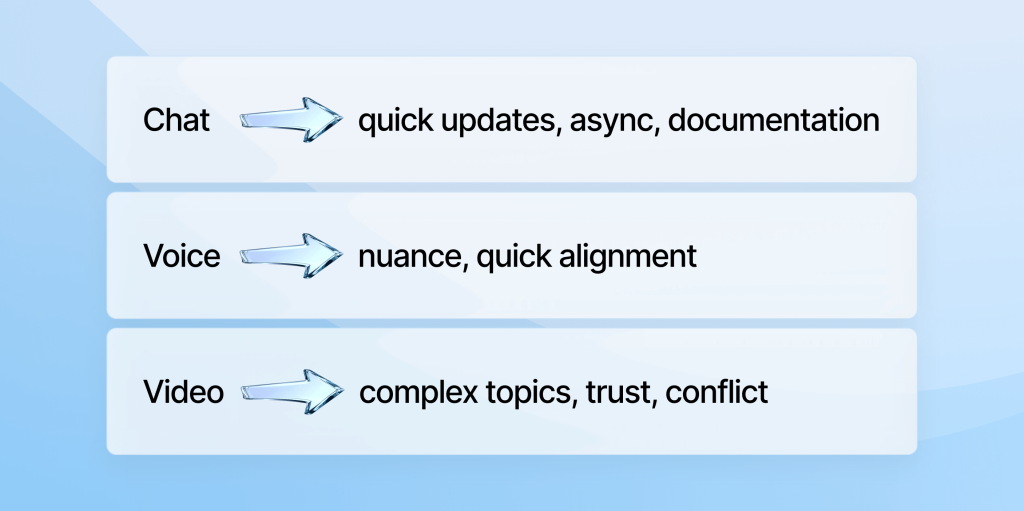
Different tasks require different communication channels. When colleagues start working together on a project, for example, they often begin with chat. When the conversation gets more nuanced, they typically escalate the discussion to voice or video calls.
During the collaboration, it’s important to use the appropriate communication format for the task at hand. For example, chat is ideal for short updates, and video calls are best when the conversation would benefit from visual cues or body language.
By using the best collaboration channel for each engagement, you can ensure that conversations are clear. Choosing the right method for the conversation — whether it’s chat, group chat, voice, or video call — reduces misunderstandings and saves time.
Key takeaway: Matching the communication channel to the task at hand makes it easier to work together.
6. Avoid notification overload
In an age of mobile devices and SaaS apps, workers are inundated with notifications that pop up on screens all day long. Do your part to minimize the noise on your colleagues’ screens by only tagging folks when action is required, and using group mentions sparingly.
Instead of sending many small messages, send comprehensive updates so that your teammates only receive one notification. This helps your teammates focus on the most important tasks without being distracted by a torrent of notifications.
Key takeaway: Minimizing notification overload makes it easier to communicate effectively.
7. Pay attention to your tone
These days, much of collaborating is done via chat and messaging. While text is perfectly suitable for relaying information, it lacks vocal and visual cues — which means your messages can be misinterpreted. By using neutral, professional language and being careful when disagreeing with a colleague or giving constructive feedback, you can increase the chances your messages come across as intended.
Not everyone has the same sense of humor, so don’t try to be funny. Use a professional, friendly tone that makes your colleagues feel comfortable.
Key takeaway: A clear tone reduces misunderstandings and improves communication across distributed teams.
8. Respect time zones and schedules
When working with colleagues across geographies, be mindful of the time zones. You can’t expect coworkers in India or Australia to happily join a meeting that takes place at 12 p.m. New York City time.
To make life easier for everyone, lean on async collaboration so everyone can contribute to a project at the best time. In the event you need to schedule an all-hands meeting, make sure it’s recorded. That way, if they can’t attend the meeting live, colleagues on the other side of the world can watch the video replay during their normal working hours.
Key takeaway: Respecting your colleagues’ time zones keeps communication inclusive and efficient.
9. Hand projects off clearly
Clear project handoffs prevent confusion and keep working moving along. When passing a project to a colleague, summarize what’s complete, what still needs to be done, and any risks or open questions.
Make sure there’s a clear owner for the next step in the project, and make sure that the individual understands their responsibilities. By overcommunicating during project handoffs, you can keep your team aligned and ensure projects stay on schedule.
Key takeaway: Clear handoffs keep projects on track.
10. Flag blockers early
In the ideal world, teams would work together efficiently every day and projects would never fall off-track. Unfortunately, that’s rarely the case. As soon as you identify progress is at risk, speak up. Clearly describe what’s blocking you and what resources you need to move forward.
Ultimately, blockers aren’t failures; they’re shared problems. The faster your team is aware of these obstacles, the sooner you can work together on a fix. When you wait until a deadline passes to speak up, you put unnecessary stress on your team, and you could put your business at risk.
Key takeaway: The faster you flag blockers, the sooner you can figure out how to remove them.
4 collaboration best practices that support chat etiquette
In addition to prioritizing virtual team chat etiquette, it’s also important to follow proven organizational collaboration best practices.
Value different perspectives and include everyone
Effective teamwork is rooted in diverse backgrounds. Recognize that team members each bring unique experiences and insights to the table. While it’s easy to prioritize the loudest and fastest voices, communication is more effective when quieter team members or less visible colleagues are brought into the mix.
In the ideal world, your team would get along swimmingly, and no one would butt heads. But in truly collaborative environments, disagreements come with the territory. Encourage your team to disagree with each other respectfully. To avoid having any employees feeling overlooked, make sure that each teammate receives proper credit for their contributions.
Key takeaway: Valuing diverse perspectives and including everyone strengthens team decisions and builds a more inclusive, productive culture.
Be accountable and claim ownership
Teams communicate more effectively when accountability and ownership are clearly defined and consistently practiced. Each colleague should be clear about what they own and what they don’t, and everyone should follow through on their commitments and meet deadlines (or give a proper head’s up when that might not happen).
Whenever you make a mistake, simply admit you’re in the wrong, and come up with ideas on how to move past it. Don’t shift the blame or throw someone else under the bus for something you got wrong.
Key takeaway: Taking ownership and being accountable builds trust — and a stronger, more collaborative team.
Document decisions
Record all team decisions in a shared drive that everyone can access, including context, supporting documentation, and what the determined course of action is. Write down who was involved in the decision-making process and link to any relevant discussions.
Clear documentation prevents misunderstandings, creating a culture of trustworthiness. It also streamlines onboarding, helping new team members get up to speed quickly.
Key takeaway: Documenting decisions creates a transparent, reliable record the team can reference at any time.
Prioritize version control
Everyone who’s collaborated on documents with colleagues working out of other locations knows the drill: Files get buried in never-ending email chains, and each file has a different name, with initials of contributors stretching out in a chain as far as the eye can see.
This cacophonic setup leads to confusion and errors, and it also eats up a lot of time.
Avoid this by adopting document labeling conventions to ensure the team is always working off the latest version. While you’re at it, delete outdated versions to make sure no one accidentally starts working off an older document.
Whenever possible, use cloud-based tools like Google Workspace and Microsoft Office 365, which keep documents updated in real time. This makes it almost impossible for someone to work off the wrong draft.
Key takeaway: Proper version control prevents errors and keeps teams productive.
Effective collaboration starts with etiquette!
When you go out to a fancy dinner, you’re on your best behavior because you’ve learned the proper etiquette for the occasion.
Effective workplace communication requires similar manners.
In addition to using the right tools, digital communication etiquette at work is about how team members engage with each other — including respecting colleagues’ preferred communication platforms, which is easy when you invest in tools that connect chats across platforms.
By communicating clearly and respecting colleagues’ schedules, distributed teams can work together more efficiently, avoiding costly misunderstandings along the way.
While collaboration etiquette may seem unimportant, it has a massive impact on productivity and overall business success.
By following the principles outlined in this piece, you can ensure projects move forward smoothly, making it that much easier for your organization to achieve its goals.
Start by trying out one or two of these tips this week and see where it takes you!